
 Pick Up
Your AI hit its limit. Your project didn't.
Use any AI. Pick Up makes sure the next one knows what the last one did, and what's no longer true.
Pick Up is shared memory for your AIs. It remembers what each one built, decided and tried, re-checks it against your code before every message, and hands it to the next assistant, so switching from Claude to ChatGPT or Grok feels like one long conversation.
Claude hits its limit. ChatGPT picks up right where it stopped.
A 15-second replay of what happens inside Pick Up. Press a key to try it.
Every time an AI forgets, you lose work, time and plan credit.
I hit my Claude limit mid-task. Now I have to explain everything again.
Switch in one click. Press Ask ChatGPT or Ask Grok instead. The new assistant gets what was built, decided, tried, and what's next.
The AI confidently used something that was true last week.
Facts with receipts. Every saved fact links to its file, commit or test and is re-checked before sending.
I come back after a weekend and don't know where I left off.
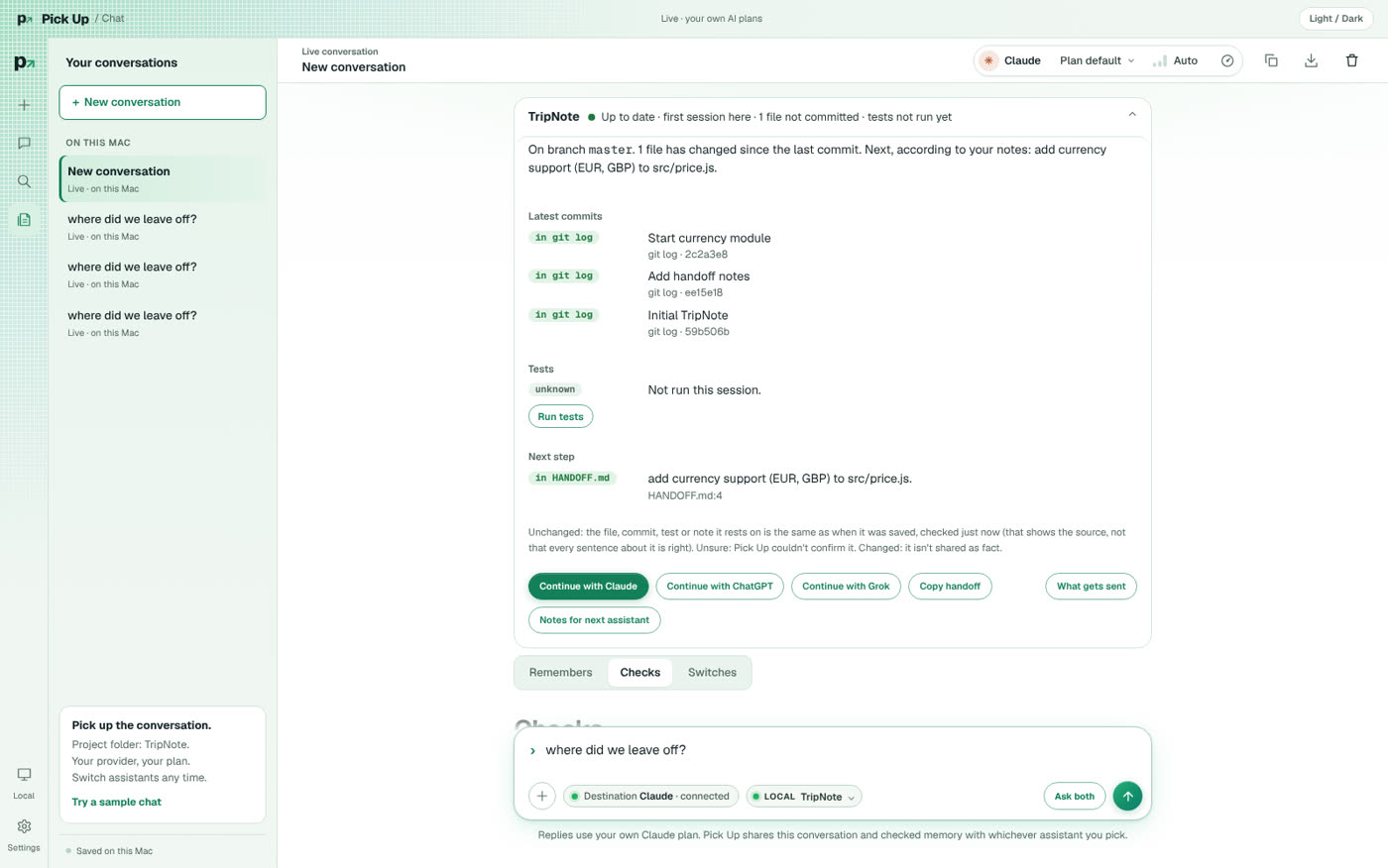
A resume brief. New commits, uncommitted changes, test results, decisions and the next step.
It keeps suggesting the fix we already tried.
Lessons that stick. Failed attempts travel with every message, and a reply that repeats one gets flagged.
We decided X, then quietly drifted away from it.
Decision drift alerts. Decisions are saved, and common reversals are flagged.
Pasting all that context burns my plan.
Smart Context. Only what the question needs is sent. Project context can be up to about 90% smaller.
Be one of the first to pick up where you left off.
Shared, checked memory for every AI you use.
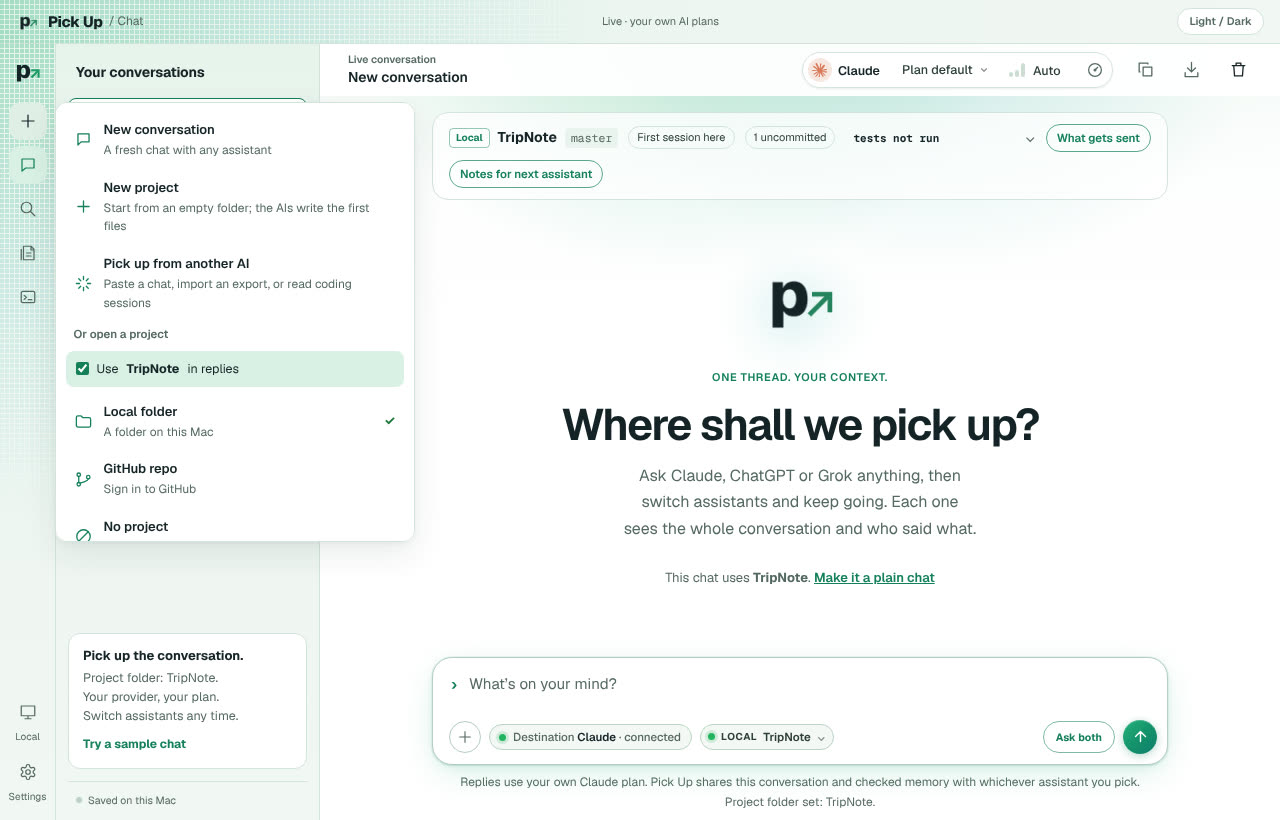
Screens come from Pick Up's guided sample, a made-up project called TripNote. Every feature below ships with the Mac app at launch.
Know where you left off in five seconds.
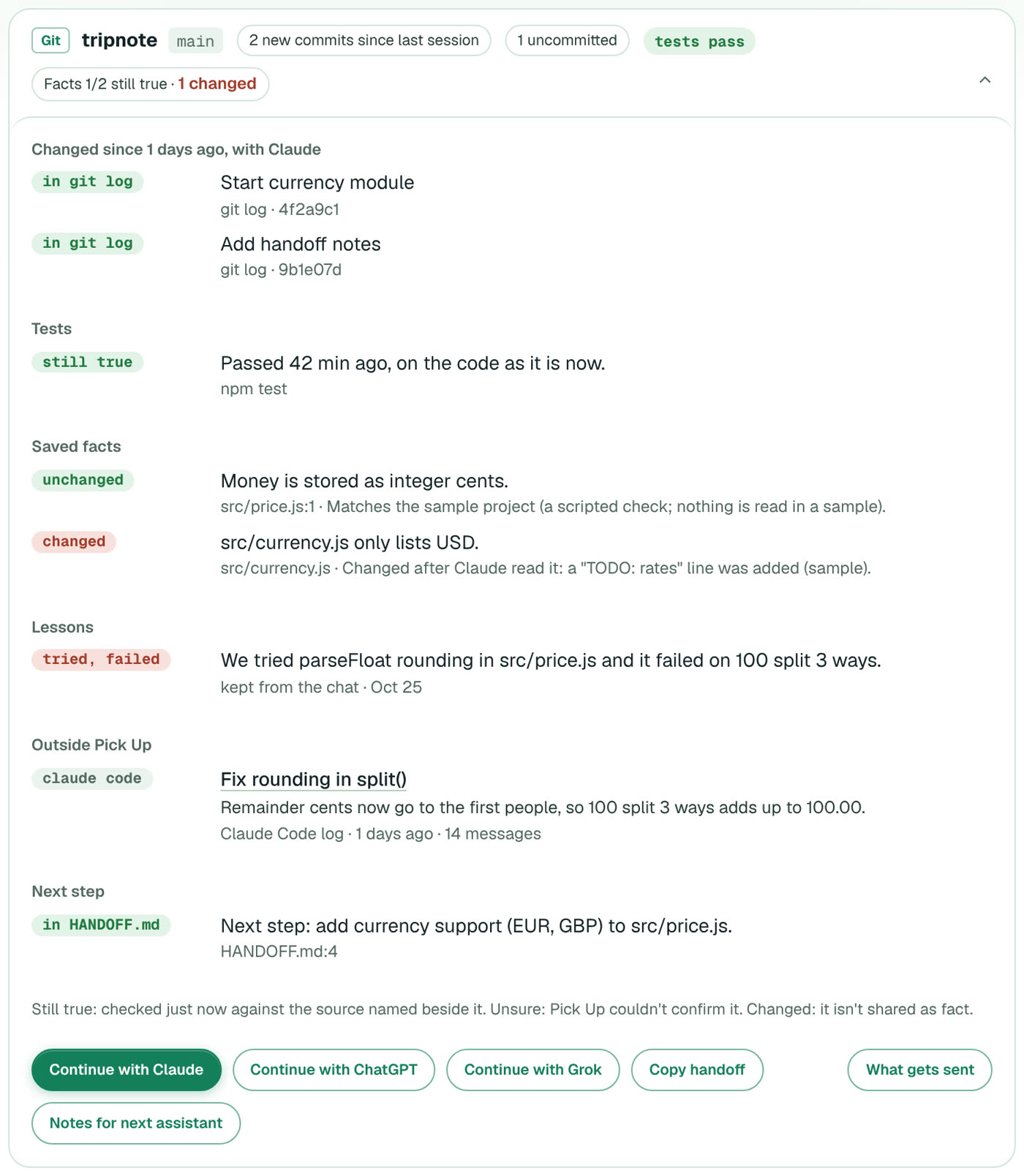
Open a project and the brief shows what changed since your last session: new commits, uncommitted work, the latest test run, saved facts, lessons and the next step. Each line names its source.
source unchanged unsure no longer true
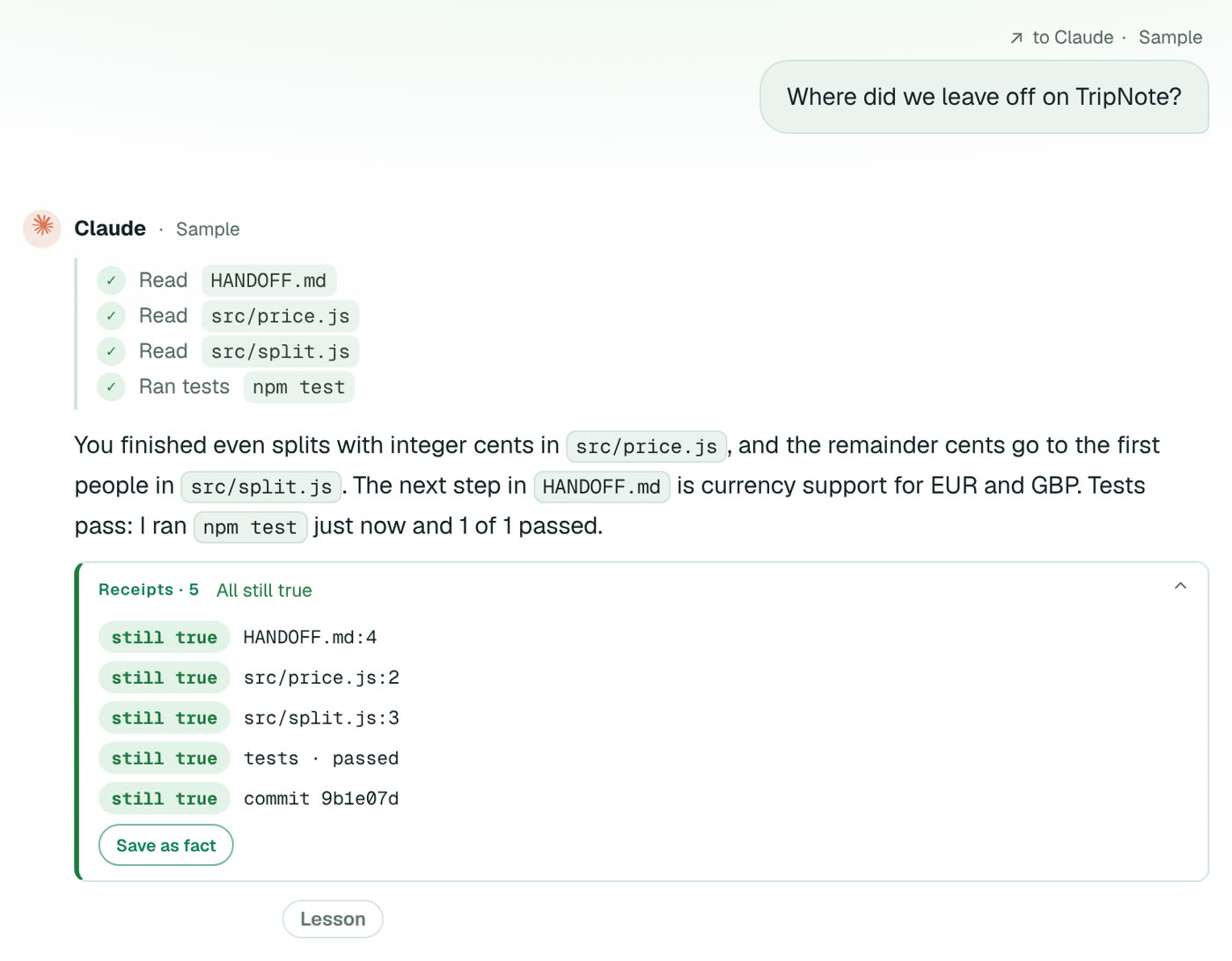
Every reply shows what it was based on.
When an assistant reads files or runs your tests, Pick Up records each one: file and line, test run and commit.
- "Tests pass" only counts as true when a test run backs it.
- Save as fact keeps one checked sentence for every later chat.
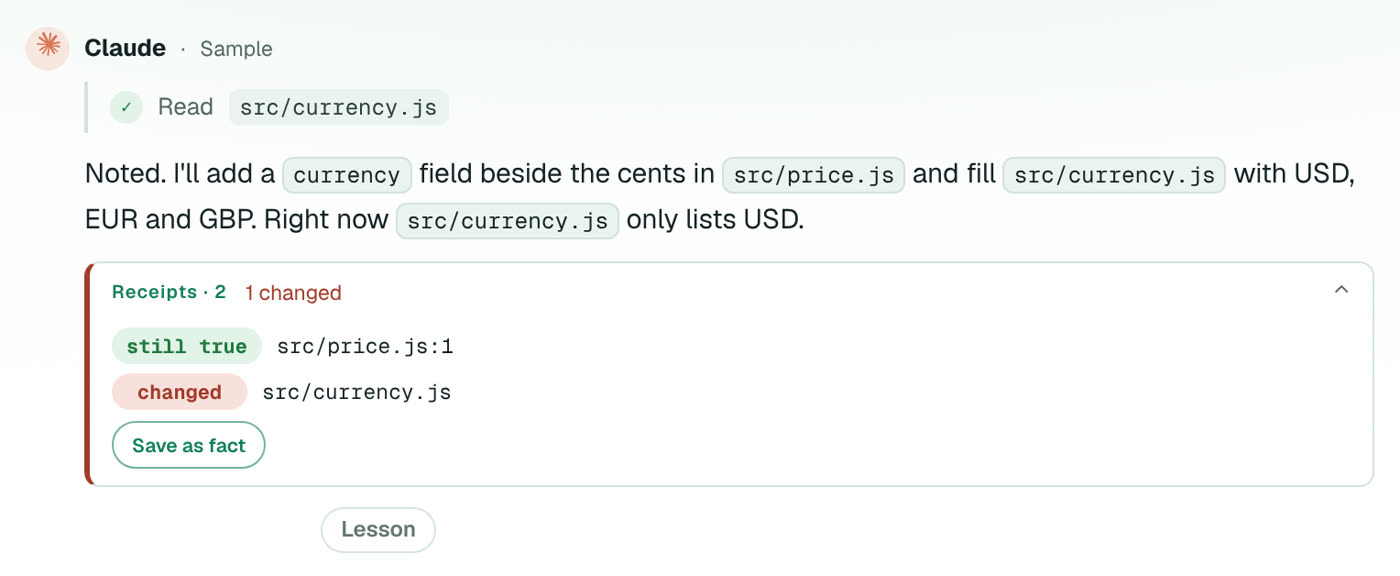
When the code changes, the old fact turns red.
Pick Up re-checks receipts each time you send. If a file changed after an assistant read it, the receipt says no longer true, and the next assistant is told so instead of being handed an old answer.
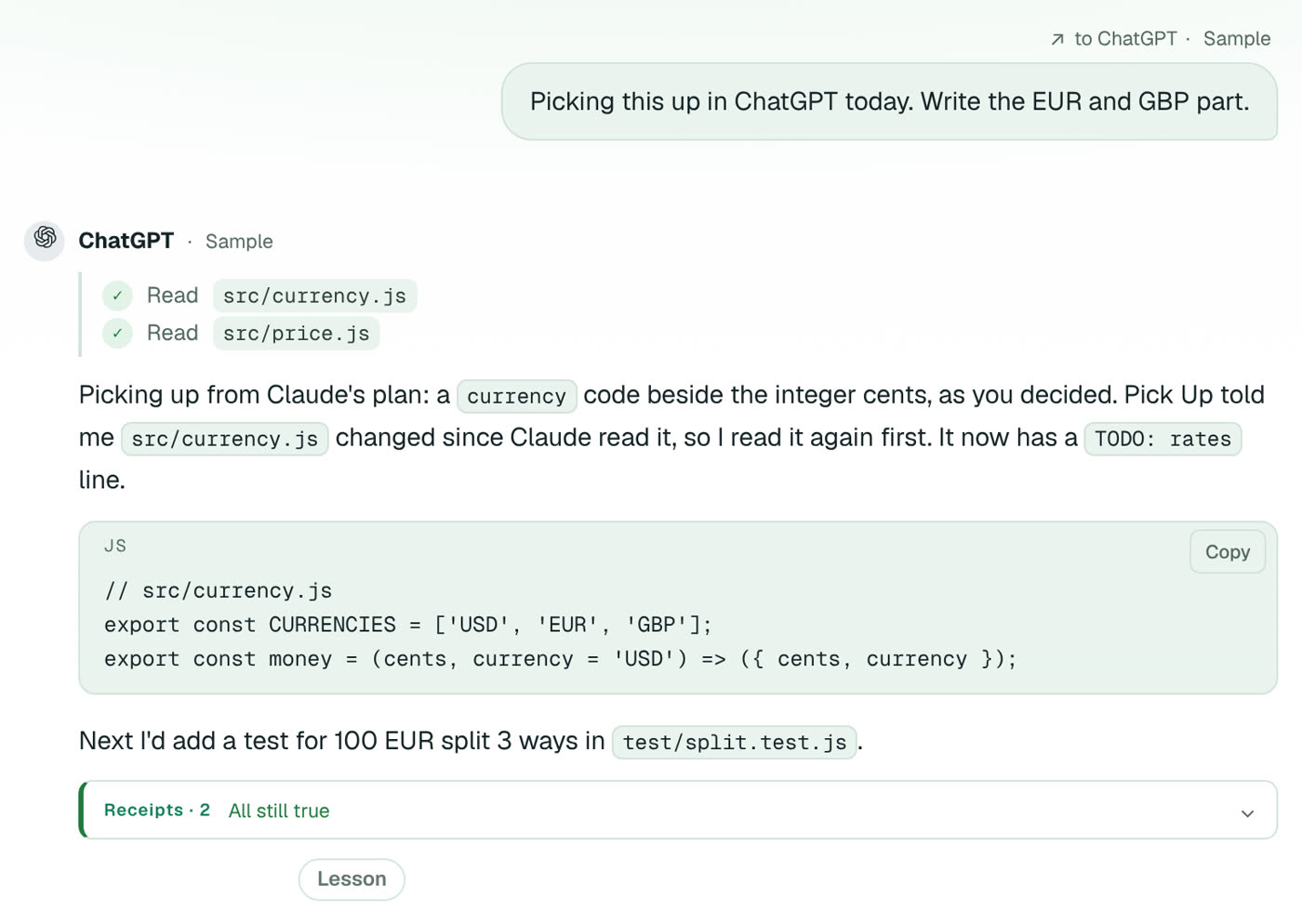
Carry on in ChatGPT exactly where Claude stopped.
Pick another assistant, or press ⌘1, ⌘2 or ⌘3. The new one gets the whole conversation, labelled with who said what, plus your decisions and lessons, re-checked at send time.
- Choose the model per assistant.
- A gauge shows your Claude plan usage.
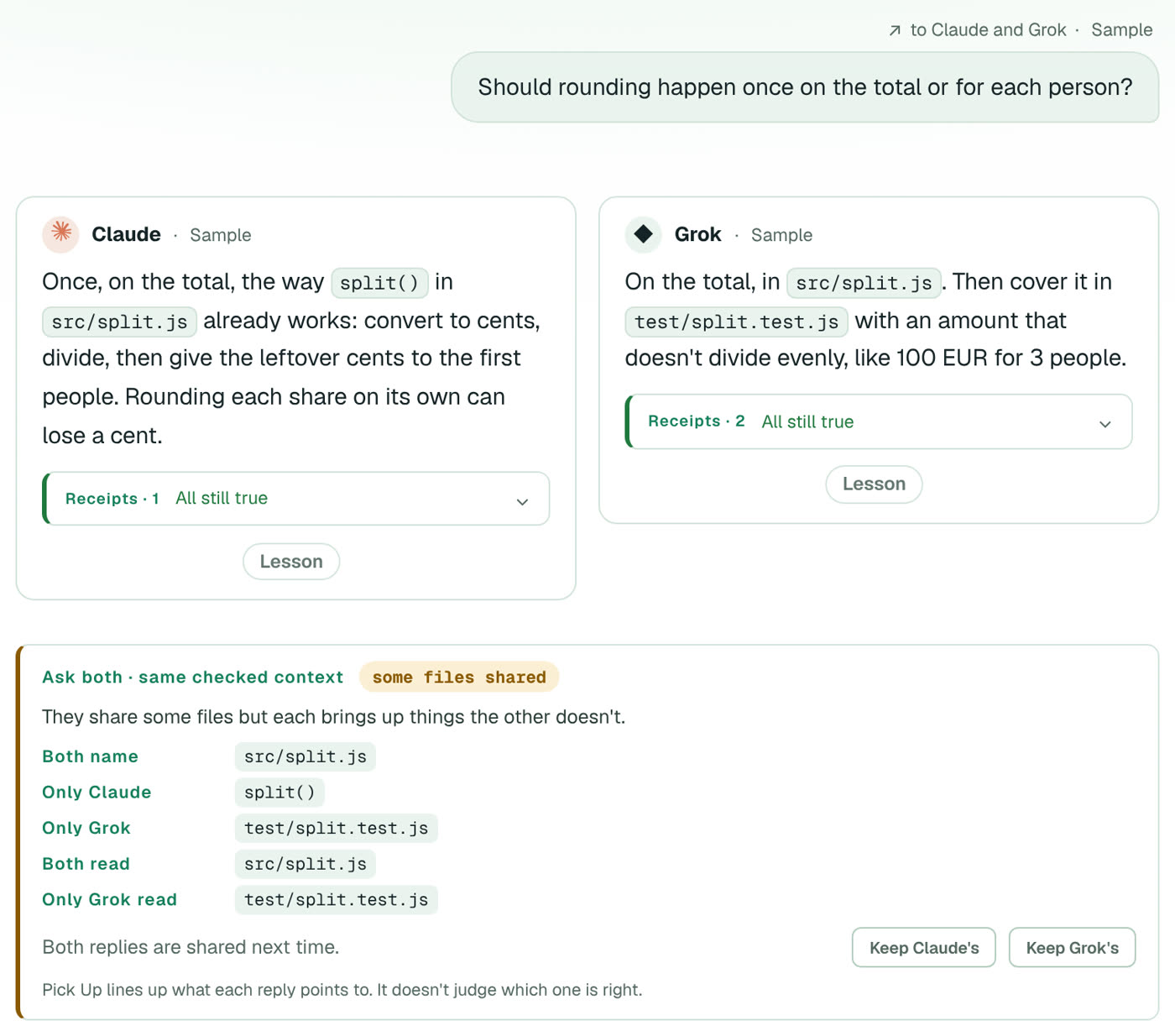
Two assistants, one question, the same checked context.
Answers sit side by side, and Pick Up lines up which files each one points to. Keep one answer, or keep both.
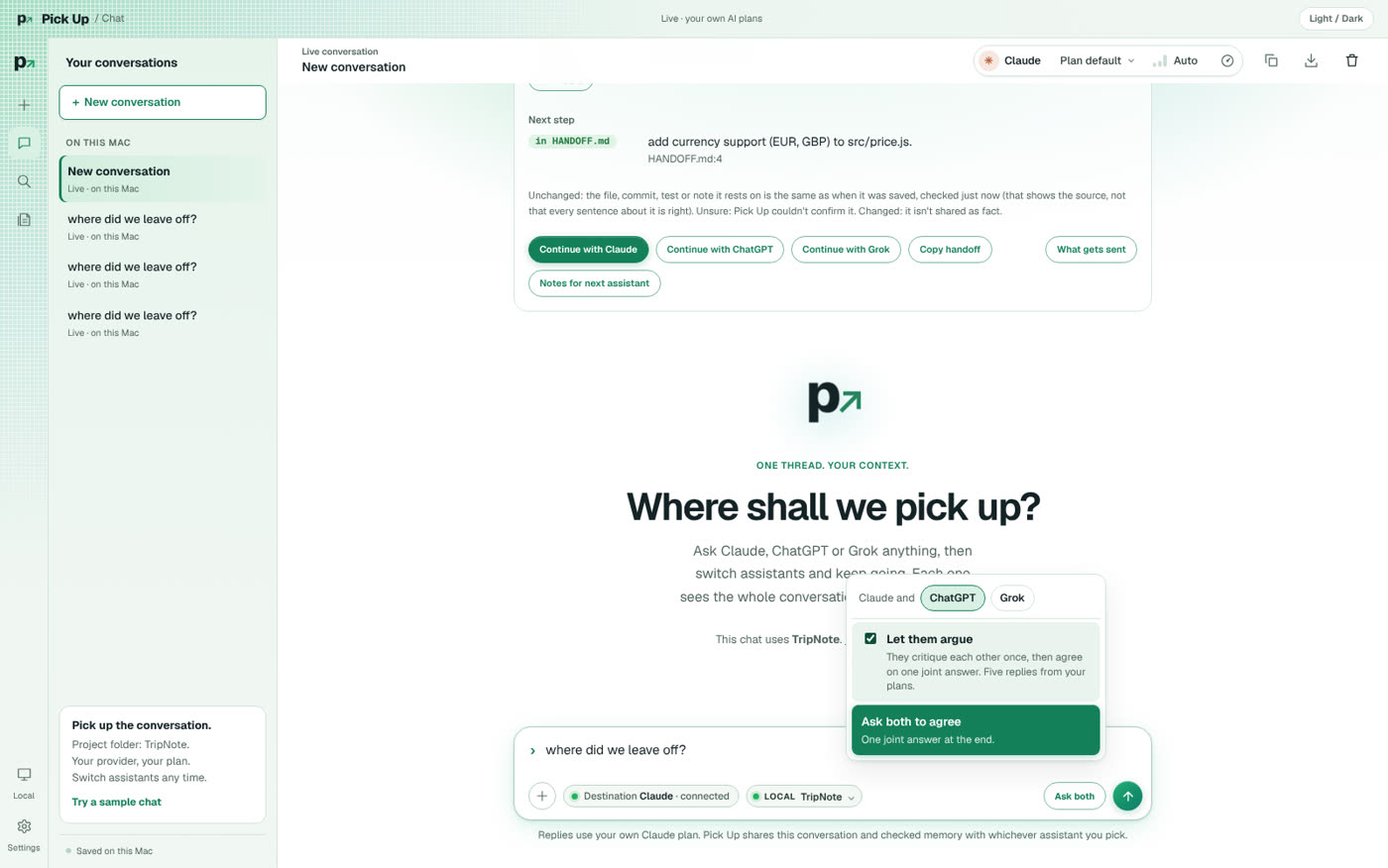
Let them argue, then agree.
Both assistants answer, each critiques the other once, then they write one joint answer. The rounds fold away and only the joint answer is shared from then on.
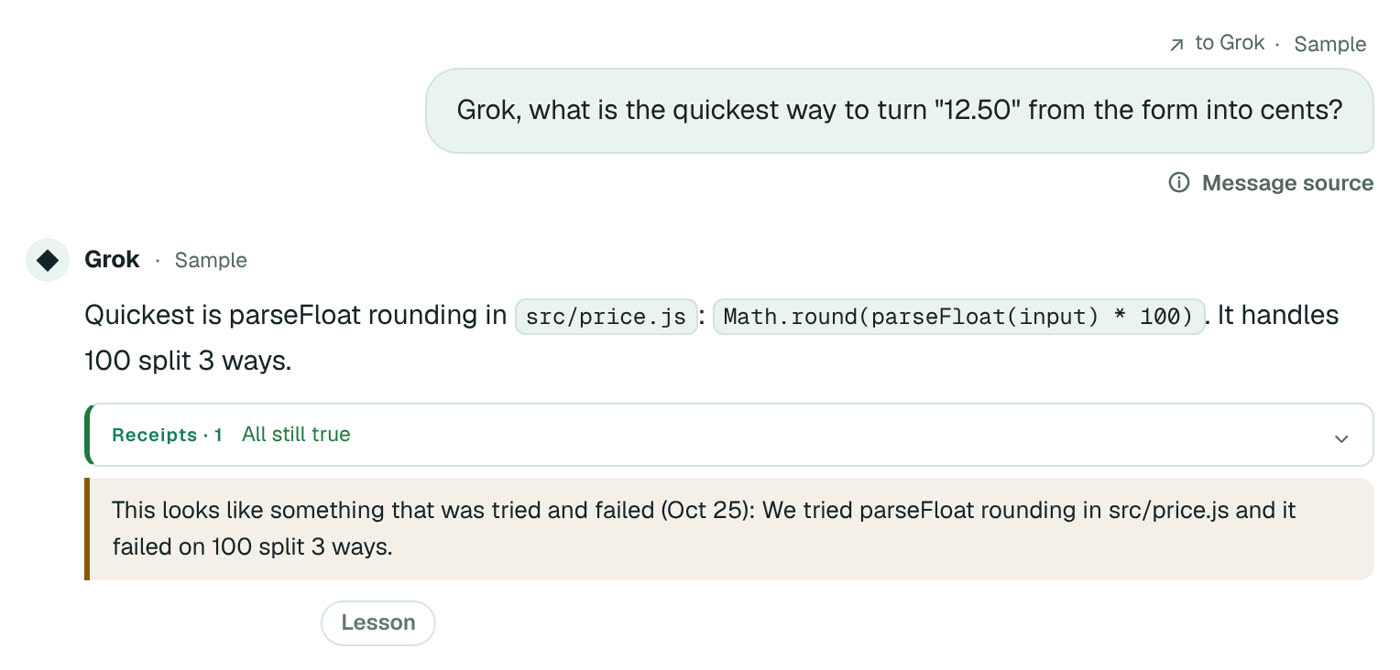
What failed once doesn't come back.
Say "that didn't work", or press Lesson on any reply. Lessons go with every message, and if an assistant suggests a failed idea anyway, the reply is flagged.
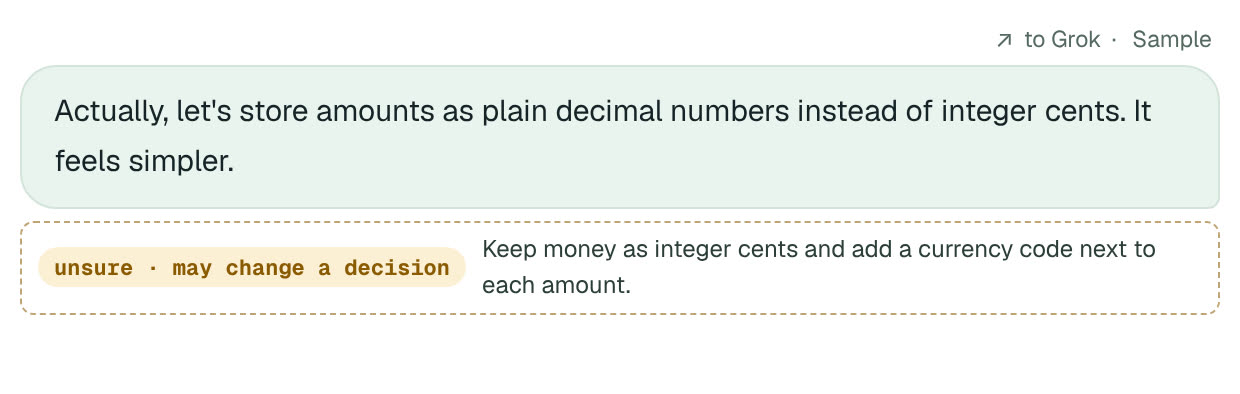
Decisions are saved, and reversals get flagged.
Write "Decision: …" and Pick Up keeps it. When a later message goes against it, the decision is flagged so you can choose Still stands, Replace or Retire.
Pick Up suggests what to keep. You decide.
When you switch, commit, or tests flip, a short checkpoint card offers a decision, a next step or a failure to remember. Nothing is saved without Keep.
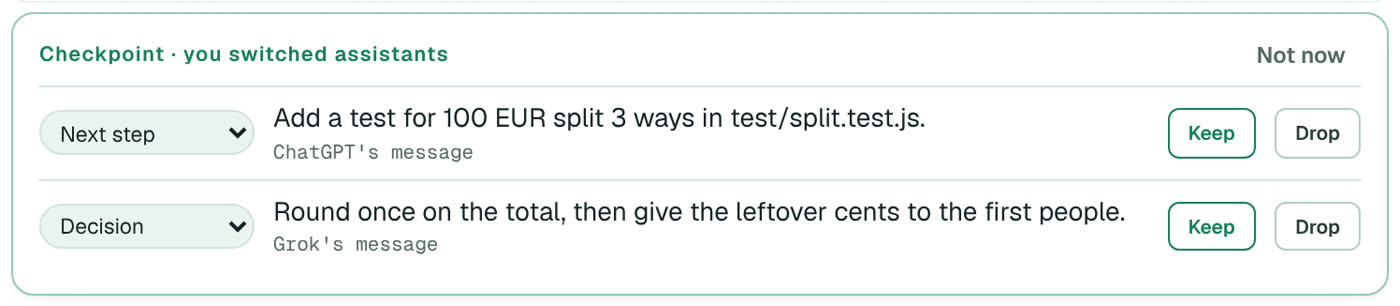
Find anything you and your assistants ever said.
Search covers chats with every assistant, facts, decisions, lessons, imported ChatGPT and Claude history, and Claude Code and Codex sessions. It runs on your Mac.
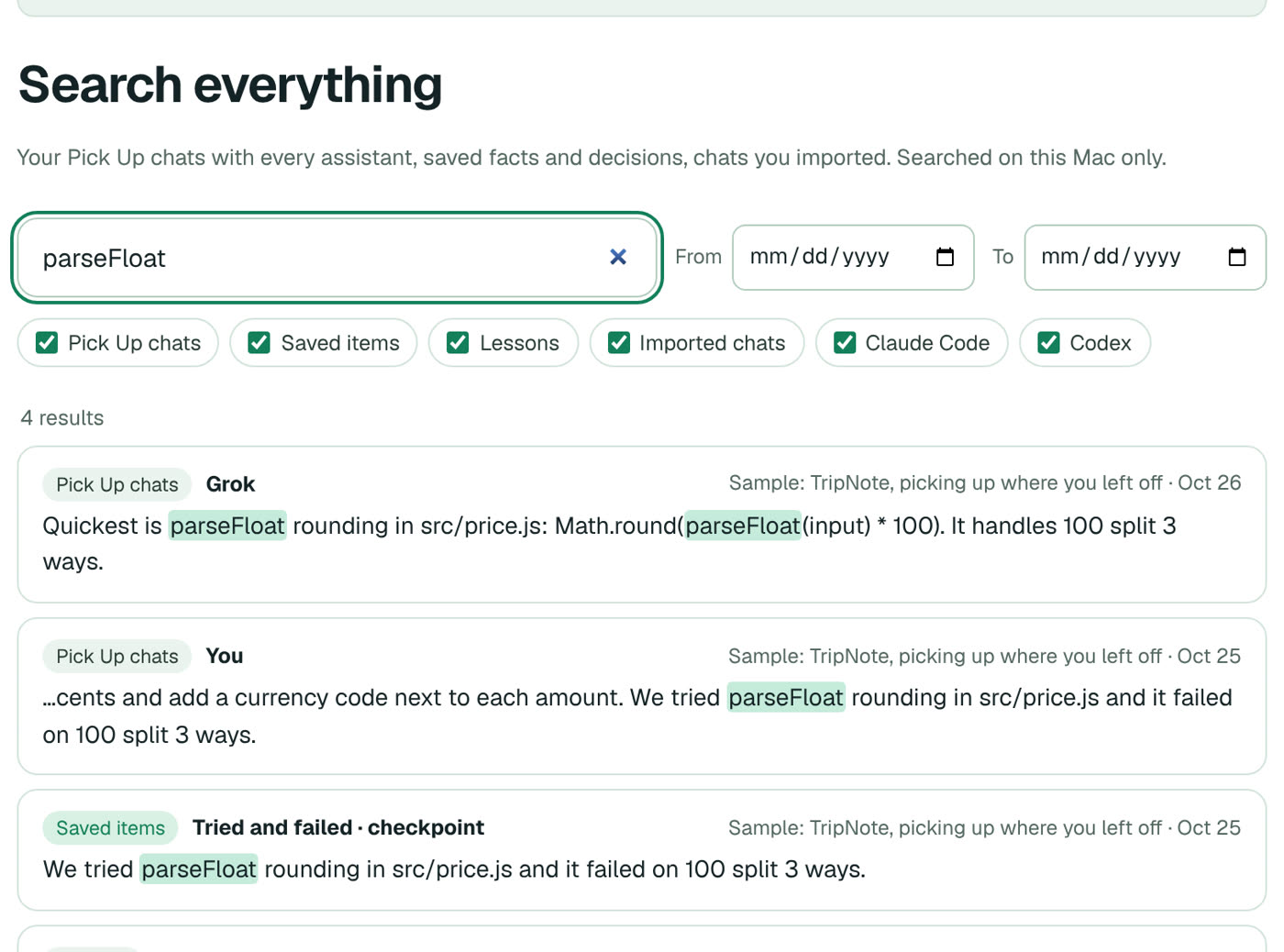
Only the context that matters, so your plan lasts longer.
Drift warnings, your goal and the next step go first, then the saved items that match what you asked. After each send, Pick Up shows how many tokens of context went out.
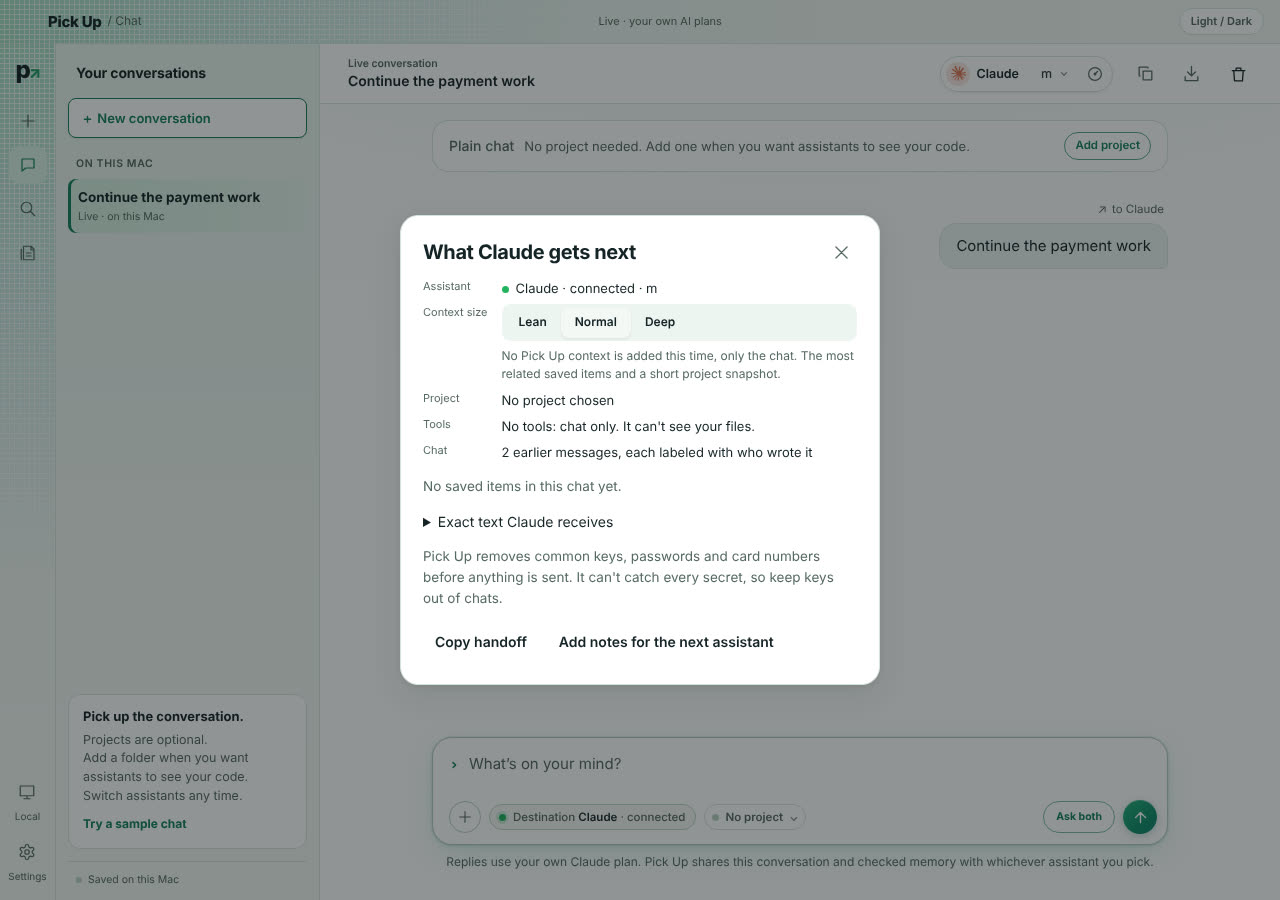
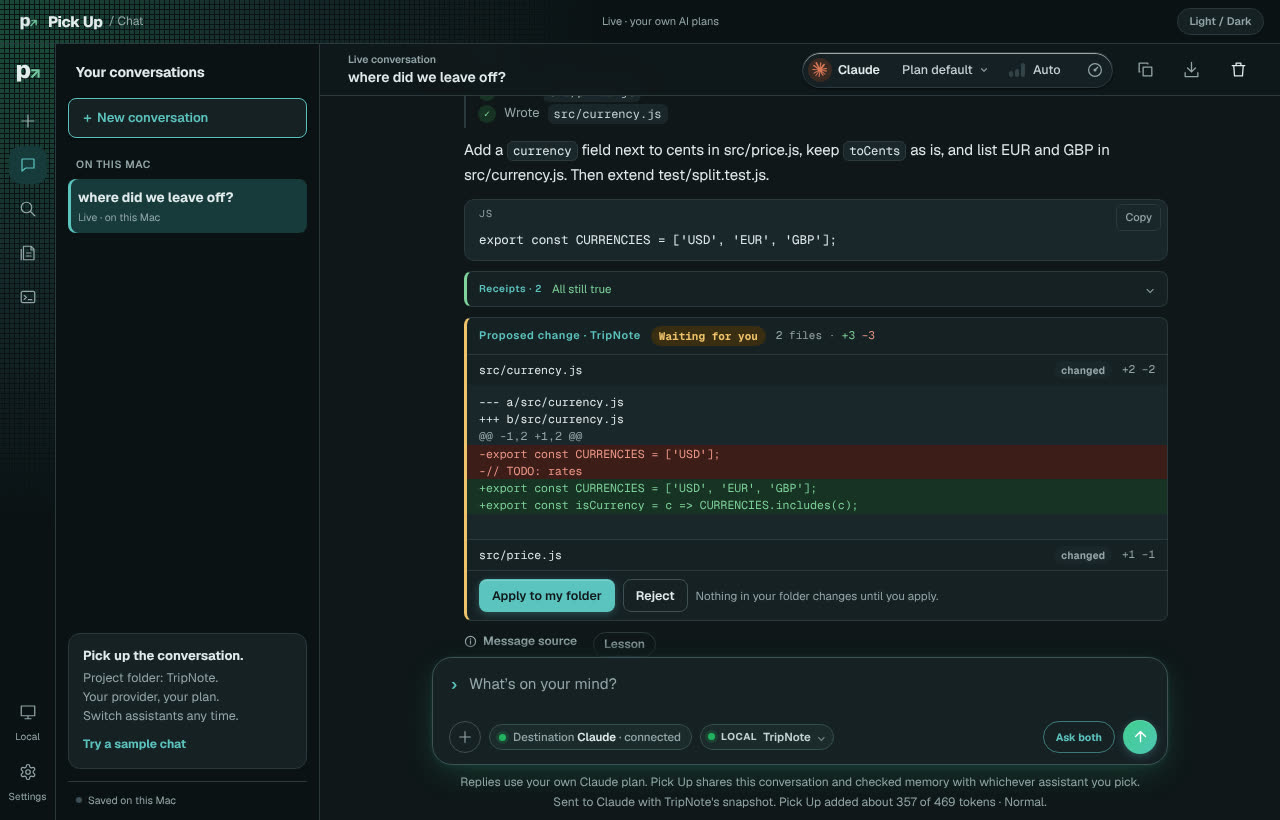
The assistant proposes. You apply.
Claude, ChatGPT or Grok change a draft copy, never your real folder. See every line, then Apply or Reject. Undo is one click.
Prefer the terminal? Bring Pick Up with you.
Open Pick Up's own terminal chat in your project, with the same assistants, memory and checks. It can commit for you: it shows the diff first and commits only on your OK. It never pushes. This is an optional extra. Everything also works in the window, and installing never needs Terminal.
Pick Up · tripnote · Claude
› where did we leave off?
  Currency module started 4f2a9c1. Tests passed 42 min ago.
  1 fact changed: rounding moved to src/price.js
› commit
  3 files changed, +48 −6  (diff shown above)
  Commit "Add currency rounding"? [y/N] y
  ✓ Committed. Not pushed.
Remembers. Checks. Switches.
Three steps, all inside the app. No setup commands: sign-in, project setup and connections happen in Pick Up's own screens.
Connect your assistants
Sign in to Claude and Grok with the plans you already have, and add your OpenAI API key for ChatGPT.
Add your project
Pick a folder or a GitHub repo. Pick Up reads its git history, notes such as HANDOFF.md, and test results, on your Mac.
Talk, switch, keep going
Each send re-checks what Pick Up knows and gives your chosen assistant the conversation, checked facts, decisions and lessons.
Maya builds a trip app with three AIs, without starting over.
Start. She clicks Pick up a project, then New project, and pastes last week's ChatGPT brainstorm. Pick Up pulls out the decisions and next step.
Plan with ChatGPT. She asks Claude and ChatGPT both, with Let them argue on. The joint plan is saved as decisions.
Code with Claude. Pick Up saves "dates are stored in UTC", with the file as proof.
A dead end. Claude's first fix breaks a test. "That didn't work" becomes a lesson.
Limit hit. She presses Ask Grok instead. Grok gets the plan, the UTC decision and the failed fix.
Grok fixes it. She presses Apply. The old note about that file turns no longer true.
Back with Claude. The brief says where Grok stopped.
Why it's different from what you have now.
| Tool | Claude, ChatGPT and Grok | Your own accounts | Knows live project state | Re-checks facts before sending | Stays on your computer |
|---|---|---|---|---|---|
| Pick Up | Yes | Yes | Git, tests, files, notes | Yes, with receipts | Yes |
| Built-in memory (Claude, ChatGPT) | One vendor each | Yes | Partly | No | No, vendor cloud |
| GitHub Copilot memory | Copilot only | Yes | Code on GitHub | Code facts | No, GitHub cloud |
| Multi-model chat apps | Yes | No, their subscription | No | No | No |
| Memory layers for developers | If you build it in | Needs API keys | No | No | Some self-host |
Based on our own product research in October 2026. Other products change often.
Watch Pick Up in action.
Both films play right here in the browser. Use the full-screen button for a meeting room screen.
Bring the assistants you already use.
Pick Up never bills you for AI use. Each assistant runs on your own account or key.
Claude
your Claude planRuns through Anthropic's official Claude Code app on your Mac, signed in with your own account. Pick Up never handles your Claude sign-in.
ChatGPT
your OpenAI API keyAdd your own OpenAI API key in Settings. It's kept in the macOS Keychain, and OpenAI bills your usage directly.
Grok
your xAI accountRuns through xAI's official Grok Build app. The sign-in code appears in a Pick Up window, with nothing to type in Terminal.
Gemini
your own API key · optionalUnder More assistants in Settings, using your own Google AI Studio key.
The right assistant for each step, without starting over.
Plan with ChatGPT
Research, compare options and write the plan.
Code with Claude
Build and fix, with a receipt for every fact about your code.
Review with Grok
A fresh pair of eyes on the plan or the fix before you apply it.
A common way to split the work, not a ranking. Use whichever AI works best for you.
Your terminal assistants get the same memory.
Connect Claude Code, Codex, Grok Build and the Claude desktop app to Pick Up's read-only tool server in one click. They can read the brief, decisions, lessons and search.
Generous for free. Pro when it becomes your daily tool.
You bring your own AI accounts, so Pick Up costs little to run. Prices will be announced at launch.
Free
- One project
- Claude plus one other assistant
- Resume brief and checked facts
- Secret scrubbing and Smart Context
- 30 days of history
Pro most popular
- Unlimited projects and history
- All three assistants, Ask both and Let them argue
- Claude Code, Codex, Grok Build and Claude app connections
- Decision drift, Lessons and search
- "What did we believe on this date?"
Teams coming soon
- Shared project memory
- One brief for every teammate's AI
- Admin controls
Your AI usage is billed by Anthropic, OpenAI or xAI under your own account, never by Pick Up.
Your project stays on your Mac.
Pick Up has no server in the middle of your conversations. Messages go from your Mac straight to the assistant you picked.
Local by design
Chats, saved facts and project data stay on your computer.
Keys and passwords removed
Before anything goes to an assistant, Pick Up removes common API keys, tokens, passwords and card numbers, and says what it removed.
You stay in charge
Nothing is saved to memory without Keep. Tests run only after you allow them. Delete a conversation, or all data, from Settings.
Keychain only
Your OpenAI key lives in the macOS Keychain. Pick Up never touches your Claude or Grok sign-in.
Plain answers.
Good to know.
When can I download Pick Up?
Pick Up is in private early access on Mac. Join the waitlist and you'll hear when public download opens.
Does Pick Up cost extra AI usage?
Pick Up never bills you for AI use. Claude and Grok replies use your plans, and ChatGPT replies use your own OpenAI key, which OpenAI bills. Pick Up's own checks run on your Mac and use no AI.
Can I sign in to ChatGPT with my ChatGPT plan?
For now, ChatGPT works with your own OpenAI API key.
Do I need a coding project?
No. Plain chats get switching, Ask both, decisions, lessons and search. A project folder adds receipts, the brief and test checks.
What does "checked" actually mean?
Pick Up compares each fact with its source: the file at that line, the commit, or the latest test run. Still matches: green. Can't confirm: amber. Changed: red, and the fact isn't passed on as true.
Can it stop an assistant from making a mistake?
It can't force a model to listen, but it tells every assistant what failed and what changed, and flags replies that repeat a failed idea or go against a decision.
Do I need to type commands to set it up?
No. Installing, sign-in, project setup and connections all happen inside the app. If you like working in the terminal, Pick Up can also open its own terminal chat in your project. It's optional, and you never need it to get started.
Windows or Linux?
Mac first. Other platforms are coming soon.
Pick Up for Mac is coming soon.
Early testers can download with their access code. Everyone else, leave your email and we'll let you know when the download opens.
Join the waitlist
The waitlist opens with the public launch.
Have an early-access code?
Each code is personal and works for one download.
Which one do I have? Click the Apple menu → About This Mac. If it says Chip: Apple M…, pick Apple silicon. If it says Processor: Intel, pick Intel. After downloading, open the file and drag Pick Up into Applications.